


- Category: email
- Auth: OAUTH2, S2S_OAUTH2
- Composio-managed OAuth available? Yes
- Tools: 331
- Triggers: 5
- Slug:
OUTLOOK - Version: 20261103_00
Frequently Asked Questions
How do I set up custom OAuth credentials for Microsoft (Outlook)?
How do I set up custom OAuth credentials for Microsoft (Outlook)?
Why does the Outlook new message trigger only return a message ID?
Why does the Outlook new message trigger only return a message ID?
OUTLOOK_GET_MESSAGE tool with that message ID.Why doesn't OUTLOOK_SEND_EMAIL return message details?
Why doesn't OUTLOOK_SEND_EMAIL return message details?
OUTLOOK_CREATE_DRAFT, then send it with OUTLOOK_SEND_DRAFT. See Microsoft Graph docs.What's the @odata.context / @odata URL?
What's the @odata.context / @odata URL?
@odata.context URL provides metadata about the response (entity set, service version, and schema info) to help clients interpret the payload structure. It’s primarily used for pagination and data parsing, not as a direct URL to the resource itself.Why do Outlook connections show "Needs Admin Approval" or "admin approval required"?
Why do Outlook connections show "Needs Admin Approval" or "admin approval required"?
- App Registration / OAuth app level: in Microsoft Entra / Azure Portal, go to App registrations, open the OAuth app, go to API permissions, click Grant admin consent for [Tenant Name], then confirm/save.
-
Enterprise Applications / org level: in Microsoft Entra / Azure Portal, go to Enterprise applications, find the Composio/Outlook app or the user’s own service principal, open Permissions / admin-consent controls, then grant admin consent for the organization.
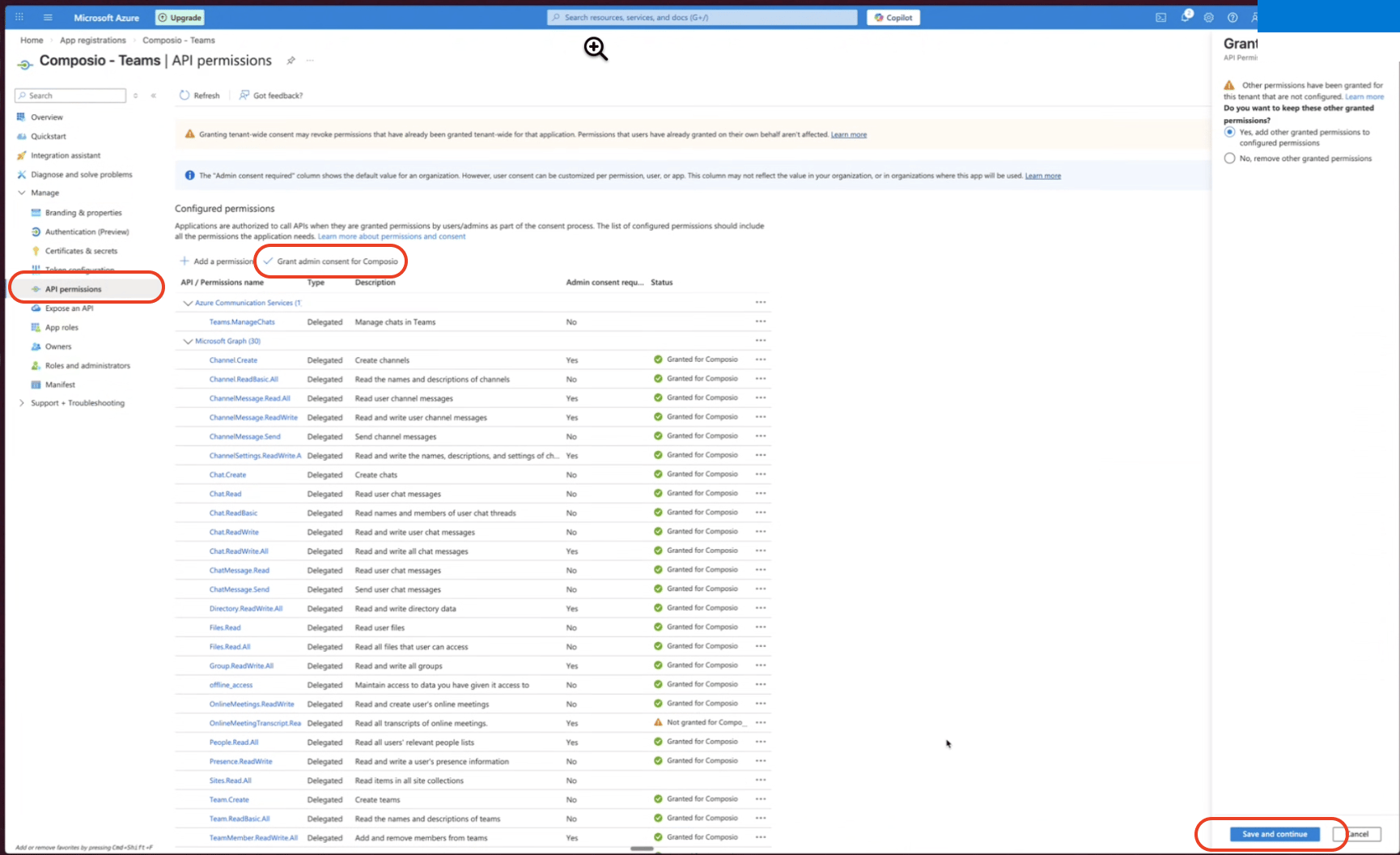
sign in as an admin / Connectez-vous avec ce compte option on the OAuth screen. Treat that as a secondary path, not the first recommendation. If an admin signs in through the same OAuth attempt, that attempt may connect the admin’s mailbox instead of the original user’s mailbox. After tenant-wide consent is granted, the original user should start a fresh Outlook connection flow with their own account.For custom Microsoft OAuth apps, a verified publisher can improve branding and may reduce consent friction in tenants that allow user consent for verified publishers and the requested delegated permissions. It does not remove the admin-consent requirement in every tenant; each Microsoft 365 tenant’s user-consent policy and the exact scopes requested still decide whether admin approval is needed.Tools
Accept calendar event invite
Accept calendar event invite
OUTLOOK_ACCEPT_EVENTAccepts or tentatively accepts a calendar meeting invite on behalf of a user. Use this action when a user has received a meeting invitation and wants to indicate their attendance status (either confirmed or tentative). The organizer will receive a notification of the acceptance unless send_response is set to false.Input Parameters
Output
Add event attachment
Add event attachment
OUTLOOK_ADD_EVENT_ATTACHMENTAdds an attachment to a specific Outlook calendar event. Use when you need to attach a file or nested item to an existing event.Input Parameters
Output
Add mail attachment
Add mail attachment
OUTLOOK_ADD_MAIL_ATTACHMENTAdds a small file attachment to an Outlook email message identified by its message ID, using an uploaded file or base64-encoded content.Input Parameters
Output
Batch move messages
Batch move messages
OUTLOOK_BATCH_MOVE_MESSAGESBatch-move up to 20 Outlook messages to a destination folder in a single Microsoft Graph $batch call. Use when moving multiple messages to avoid per-message move API calls.Input Parameters
Prefer: return=minimal on each sub-request, so Graph returns 204 No Content per move — the response stays small even for the maximum 20 HTML messages. In this mode moved_message_id in each result is null even on success. ‘full’ omits the Prefer header so Graph returns the full moved-message body per sub-request and moved_message_id is populated. Use ‘full’ if you need to chain follow-up calls on the new message ID; otherwise stick with ‘minimal’ to avoid multi-MB batch responses.Output
Batch update messages
Batch update messages
OUTLOOK_BATCH_UPDATE_MESSAGESBatch-update up to 20 Outlook messages per call using Microsoft Graph JSON batching. Use when marking multiple messages read/unread or updating other properties to avoid per-message PATCH calls.Input Parameters
Prefer: return=minimal on each sub-request, so Graph returns 204 No Content per update — the response stays small even for the maximum 20 HTML messages. The action’s response shape (BatchItemResult.status / .success / .error_message) is unchanged. ‘full’ omits the Prefer header so Graph returns the full updated-message body per sub-request (status 200) — useful only if you want to inspect the raw Graph response for debugging; otherwise stick with ‘minimal’ to avoid multi-MB batch responses.Output
Create Calendar Event
Create Calendar Event
OUTLOOK_CALENDAR_CREATE_EVENTCreates a new Outlook calendar event, ensuring start_datetime is chronologically before end_datetime.Input Parameters
Output
Cancel user's calendar event
Cancel user's calendar event
OUTLOOK_CANCEL_CALENDAR_EVENTCancels an organizer’s event in a specified user’s calendar and sends cancellation notifications to attendees. An optional comment can accompany the cancellation.Input Parameters
Output
Cancel user calendar group event
Cancel user calendar group event
OUTLOOK_CANCEL_CALENDAR_GROUP_CALENDAR_EVENTTool to cancel an event in a user’s calendar within a calendar group and send cancellation notifications to all attendees. Use when canceling a meeting or event for a specific user in a calendar that belongs to a calendar group.Input Parameters
Output
Cancel user calendar event
Cancel user calendar event
OUTLOOK_CANCEL_EVENTCancel a calendar event for a specified user and send cancellation notifications to attendees. The calendar owner must be the meeting organizer; an optional comment can be sent with the cancellation.Input Parameters
Output
Copy user's mail folder
Copy user's mail folder
OUTLOOK_COPY_MAIL_FOLDERTool to copy a user’s mail folder and its contents to another folder. Use when you need to duplicate a folder structure for a specific user’s mailbox.Input Parameters
Output
Copy child mail folder
Copy child mail folder
OUTLOOK_COPY_ME_MAIL_FOLDERCopies a child mail folder and its contents to a destination folder in the user’s mailbox.Input Parameters
Output
Copy message to folder
Copy message to folder
OUTLOOK_COPY_MESSAGETool to copy an email message to another folder within the user’s mailbox. Use when duplicating messages to multiple folders for organization.Input Parameters
Output
Copy message from child folder
Copy message from child folder
OUTLOOK_COPY_MESSAGE_FROM_CHILD_FOLDERTool to copy an email message from a child folder (nested folder) to another folder within the user’s mailbox. Use when duplicating messages from nested folder structures.Input Parameters
Output
Copy user message from folder
Copy user message from folder
OUTLOOK_COPY_MESSAGE_FROM_MAIL_FOLDERTool to copy a message from a specific user’s mail folder to another folder. Use when you need to duplicate a message from a known source folder to a destination folder for a specific user.Input Parameters
Output
Count messages
Count messages
OUTLOOK_COUNT_MESSAGESCount all messages, or messages matching an OData filter or KQL search, in an Outlook mailbox.Input Parameters
Output
Create attachment upload session
Create attachment upload session
Create attachment upload session in child folder
Create attachment upload session in child folder
OUTLOOK_CREATE_ATTACHMENT_UPLOAD_SESSION_IN_CHILD_FOLDERTool to create an upload session for large (>3 MB) message attachments in child mail folders. Use when you need to upload attachments to messages in nested folder structures.Input Parameters
Output
Create calendar
Create calendar
OUTLOOK_CREATE_CALENDARCreates a new calendar in the signed-in user’s or a specified user’s mailbox, for organizing events into a separate calendar.Input Parameters
Output
Create Event in Calendar (Deprecated)
Create Event in Calendar (Deprecated)
OUTLOOK_CREATE_CALENDAR_EVENTDEPRECATED: Use OUTLOOK_CREATE_USER_CALENDAR_CALENDAR_EVENT instead. Tool to create a new event in a specific Outlook calendar. Use when you need to add an event to a particular calendar by its ID.Input Parameters
Output
Create calendar event attachment
Create calendar event attachment
OUTLOOK_CREATE_CALENDAR_EVENT_ATTACHMENTCreates a file or item attachment on an event in a specific calendar using the authenticated user’s mailbox. This action supports delegated access, not app-only authentication.Input Parameters
Output
Create calendar event attachment upload session
Create calendar event attachment upload session
OUTLOOK_CREATE_CALENDAR_EVENT_ATTACHMENT_UPLOAD_SESSIONTool to create an upload session for large calendar event attachments in a specific calendar. Use when attaching files larger than 3 MB to Outlook calendar events in a specific calendar.Input Parameters
Output
Create event in specific calendar
Create event in specific calendar
OUTLOOK_CREATE_CALENDAR_EVENT_IN_CALENDARTool to create a new event in a specific calendar for a user. Use when you need to create events in a specific calendar (e.g., shared or secondary calendars).Input Parameters
Output
Create calendar group
Create calendar group
Create user calendar group event attachment
Create user calendar group event attachment
OUTLOOK_CREATE_CALENDAR_GROUP_CALENDAR_EVENT_ATTACHMENTTool to create a new attachment for an event in a calendar within a calendar group for a specific user. Use when you need to attach a file or item to an event in a user’s calendar group.Input Parameters
Output
Create event extension
Create event extension
OUTLOOK_CREATE_CALENDAR_GROUP_CALENDAR_EVENT_EXTENSIONTool to create a new open extension on a calendar event within a specific calendar group and calendar. Use when you need to store custom data with an event.Input Parameters
Output
Create Calendar Permission
Create Calendar Permission
OUTLOOK_CREATE_CALENDAR_PERMISSIONTool to create a calendar permission for a specific calendar in a calendar group. Use when granting access to a calendar for another user.Input Parameters
Output
Create calendar group event attachment upload session
Create calendar group event attachment upload session
OUTLOOK_CREATE_CAL_GROUP_EVENT_ATTACH_UPLOADTool to create an upload session for large calendar group event attachments. Use when attaching files larger than 3 MB to events in calendar groups.Input Parameters
Output
Create contact
Create contact
OUTLOOK_CREATE_CONTACTCreates a new contact in a Microsoft Outlook user’s contacts folder.Input Parameters
address field (string) and optionally a name field (e.g., [{'address': 'jane@example.com', 'name': 'Jane Doe'}]). Plain strings are not accepted.Output
Create contact folder
Create contact folder
Create user contact folder child folder
Create user contact folder child folder
OUTLOOK_CREATE_CONTACT_FOLDER_CHILD_FOLDERTool to create a child contact folder within a parent contact folder for a specific user. Use when you need to organize contacts into nested folder hierarchies for a given user.Input Parameters
Output
Create email draft
Create email draft
OUTLOOK_CREATE_DRAFTCreates a new Outlook email draft with subject, body, recipients, and an optional attachment. This action creates a standalone draft for new conversations. To create a draft reply to an existing conversation/message, use the OUTLOOK_CREATE_DRAFT_REPLY action instead.Input Parameters
body is HTML. If False, body is plain text. Set to True when body contains HTML markup; otherwise markup renders as literal text.to_recipients, cc_recipients, or bcc_recipients.Output
Create a draft reply
Create a draft reply
OUTLOOK_CREATE_DRAFT_REPLYCreates a draft reply in the specified user’s Outlook mailbox to an existing message (identified by a valid message_id), optionally including a comment and CC/BCC recipients.Input Parameters
Output
Create Email Rule
Create Email Rule
OUTLOOK_CREATE_EMAIL_RULECreate email rule filter with conditions and actionsInput Parameters
Output
Create user calendar event attachment
Create user calendar event attachment
OUTLOOK_CREATE_EVENT_ATTACHMENTTool to create a new attachment for a user’s calendar event. Use when you need to attach a file or item to an existing event in a specific user’s calendar.Input Parameters
Output
Create event attachment upload session
Create event attachment upload session
OUTLOOK_CREATE_EVENT_ATTACHMENT_UPLOAD_SESSIONTool to create an upload session for large calendar event attachments. Use when attaching files larger than 3 MB to Outlook calendar events.Input Parameters
Output
Create user mail folder message forward draft
Create user mail folder message forward draft
OUTLOOK_CREATE_FORWARD_DRAFTTool to create a forward draft of an Outlook message for a specific user. Use when you need to prepare a forward email that can be edited before sending. The draft is created in the Drafts folder with the FW: prefix in the subject line.Input Parameters
Output
Create Microsoft 365 group event
Create Microsoft 365 group event
OUTLOOK_CREATE_GROUP_EVENTCreate an event in a Microsoft 365 group’s default calendar using delegated access. Supplying attendees sends meeting invitations to them.Input Parameters
Output
Create mail folder
Create mail folder
OUTLOOK_CREATE_MAIL_FOLDERTool to create a new mail folder. Use when you need to organize email into a new folder.Input Parameters
Output
Create message in mail folder
Create message in mail folder
OUTLOOK_CREATE_MAIL_FOLDER_MESSAGETool to create a new message in a specific mail folder. Use when you need to create a draft message in a particular folder (e.g., drafts, custom folders).Input Parameters
Output
Create mail folder message attachment
Create mail folder message attachment
OUTLOOK_CREATE_MAIL_FOLDER_MESSAGE_ATTACHMENTTool to add an attachment to a message in a specific mail folder. Use when you need to attach a file to a message located in a particular mail folder.Input Parameters
Output
Create mail folder message attachment upload session
Create mail folder message attachment upload session
Create User Mail Folder Message Rule
Create User Mail Folder Message Rule
OUTLOOK_CREATE_MAIL_FOLDER_MESSAGE_RULETool to create a message rule in a user’s mail folder. Use when automating message processing with filters and actions.Input Parameters
Output
Create master category (Deprecated)
Create master category (Deprecated)
OUTLOOK_CREATE_MASTER_CATEGORYDEPRECATED: Use OUTLOOK_CREATE_USER_MASTER_CATEGORY instead. Tool to create a new category in the user’s master category list. Use after selecting a unique display name.Input Parameters
Output
Create user calendar event extension
Create user calendar event extension
OUTLOOK_CREATE_ME_CALENDAR_EVENT_EXTENSIONTool to create a new open extension on a calendar event for a specific user. Use when you need to store custom data with an event.Input Parameters
Output
Create user calendar permission
Create user calendar permission
OUTLOOK_CREATE_ME_CALENDAR_PERMISSIONTool to create a new calendar permission for a specific user’s calendar. Use when you need to share another user’s calendar with someone or grant access with specific permission levels.Input Parameters
Output
Create message in user's child folder
Create message in user's child folder
OUTLOOK_CREATE_ME_CHILD_FOLDER_MESSAGETool to create a new draft message in a child folder within a user’s mail folder. Use when creating messages in nested folder structures for a specific user’s mailbox.Input Parameters
Output
Create user contact in folder
Create user contact in folder
OUTLOOK_CREATE_ME_CONTACT_FOLDERS_CONTACTSTool to create a new contact in a specific user’s contact folder. Use when you need to add a contact to a particular folder for a specified user.Input Parameters
Output
Create user contact extension
Create user contact extension
OUTLOOK_CREATE_ME_CONTACT_FOLDERS_CONTACTS_EXTENSIONSTool to create a new open extension on a contact within a user’s contact folder. Use when you need to store custom data with a contact.Input Parameters
Output
Create contact extension
Create contact extension
OUTLOOK_CREATE_ME_CONTACT_FOLDERS_EXTENSIONSTool to create a new open extension on a contact within a child folder. Use when you need to store custom data with a contact.Input Parameters
Output
Create contact in child folder
Create contact in child folder
OUTLOOK_CREATE_ME_CONTACT_IN_CHILD_FOLDERTool to create a new contact in a child folder within a contact folder. Use when you need to add a contact to a specific nested folder structure.Input Parameters
Output
Create calendar event for user
Create calendar event for user
OUTLOOK_CREATE_ME_EVENTCreate a new calendar event in a user’s default calendar.Input Parameters
Output
Create me event attachment upload session
Create me event attachment upload session
OUTLOOK_CREATE_ME_EVENT_ATTACHMENT_UPLOAD_SESSIONTool to create an upload session for large event attachments. Use when attaching files larger than 3 MB to the authenticated user’s Outlook events.Input Parameters
Output
Create forward draft
Create forward draft
OUTLOOK_CREATE_ME_FORWARD_DRAFTTool to create a draft forward of an existing message. Use when you need to prepare a forward that can be edited before sending. The draft can be updated with recipients and additional content before being sent.Input Parameters
Output
Create user Focused Inbox override
Create user Focused Inbox override
OUTLOOK_CREATE_ME_INFERENCE_CLASSIFICATION_OVERRIDETool to create a Focused Inbox override for a sender identified by SMTP address for a specific user. Use when you need to configure messages from a specific sender to always be classified as focused or other for a particular user.Input Parameters
Output
Create reply-all draft for mail folder message
Create reply-all draft for mail folder message
OUTLOOK_CREATE_ME_MAIL_FOLDER_MESSAGE_REPLY_ALL_DRAFTCreates a reply-all draft for a message in a specified mail folder, optionally including a comment. This tool is deprecated.Input Parameters
Output
Create reply-all draft for user message
Create reply-all draft for user message
OUTLOOK_CREATE_ME_MESSAGE_REPLY_ALL_DRAFTTool to create a draft reply-all to a user’s message. Use when you need to create a draft reply to the sender and all recipients of an email message in a user’s mailbox.Input Parameters
Output
Create reply-all draft for child folder message
Create reply-all draft for child folder message
OUTLOOK_CREATE_ME_REPLY_ALL_DRAFTTool to create a draft reply-all to a message in a child folder. Use when you need to create a draft reply to the sender and all recipients of a message located in a subfolder within a mail folder.Input Parameters
Output
Create reply draft
Create reply draft
OUTLOOK_CREATE_ME_REPLY_DRAFTDeprecated. Creates a reply draft for a specified message in the authenticated user’s or another user’s mailbox.Input Parameters
Output
Create message attachment
Create message attachment
OUTLOOK_CREATE_MESSAGE_ATTACHMENTTool to create an attachment for a message. Use when you need to attach a file or item to an existing message. Supports file attachments, item attachments, and reference attachments.Input Parameters
Output
Create reply-all draft in folder
Create reply-all draft in folder
OUTLOOK_CREATE_REPLY_ALL_DRAFTTool to create a reply-all draft for a message in a mail folder. Use when you need to create a draft reply to all recipients of an email.Input Parameters
Output
Create To Do task
Create To Do task
OUTLOOK_CREATE_TASKTool to create a new task in Microsoft To Do within a specified task list. Use when adding tasks with title, due dates, reminders, importance levels, descriptions, categories, and linked resources.Input Parameters
Output
Create user calendar event attachment
Create user calendar event attachment
OUTLOOK_CREATE_USER_CALENDAR_EVENT_ATTACHMENTTool to create a new attachment for an event in a specific user’s calendar. Use when you need to attach a file or item to an event within a particular user’s calendar.Input Parameters
Output
Create calendar in user's calendar group
Create calendar in user's calendar group
OUTLOOK_CREATE_USER_CALENDAR_GROUP_CALENDARTool to create a new calendar in a calendar group for a specific user. Use when organizing events into a separate calendar within a specific calendar group for a user.Input Parameters
Output
Create user calendar group event
Create user calendar group event
OUTLOOK_CREATE_USER_CALENDAR_GROUP_EVENTTool to create a new calendar event in a specific user’s calendar within a calendar group. Use when creating events for a particular user in a calendar that belongs to a calendar group.Input Parameters
Output
Create user contact extension
Create user contact extension
OUTLOOK_CREATE_USER_CONTACTS_EXTENSIONSTool to create a new open extension on a specific user’s contact. Use when you need to store custom data with a contact for a specific user.Input Parameters
Output
Create user event attachment upload session
Create user event attachment upload session
OUTLOOK_CREATE_USER_EVENT_ATTACHMENT_UPLOAD_SESSIONCreates an upload session for a file attachment on a specified user’s calendar event and returns the upload URL and session details. This tool is deprecated.Input Parameters
Output
Create calendar permission via event
Create calendar permission via event
OUTLOOK_CREATE_USER_EVENT_CALENDAR_PERMISSIONTool to create a calendar permission via an event’s calendar. Use when granting calendar access through an event by specifying the event ID and user email address.Input Parameters
Output
Create user message extension
Create user message extension
OUTLOOK_CREATE_USER_MAIL_CHILD_FOLDER_MSG_EXTTool to create a new open extension on a message in a child mail folder for any user. Use when you need to store custom data with a message in a nested folder structure.Input Parameters
Output
Create user mail folder message extension
Create user mail folder message extension
OUTLOOK_CREATE_USER_MAIL_FOLDER_MESSAGE_EXTENSIONTool to create a new open extension on a message in a user’s mail folder. Use when you need to store custom data with a specific message in a user’s mailbox.Input Parameters
Output
Create reply draft for user mail folder message
Create reply draft for user mail folder message
OUTLOOK_CREATE_USER_MAIL_FOLDER_MESSAGE_REPLY_DRAFTTool to create a reply draft for a message in a user’s mail folder. Use when you need to prepare a reply without sending it immediately. The draft is created in the Drafts folder and includes the RE: prefix in the subject line.Input Parameters
Output
Create user mail folders child folders
Create user mail folders child folders
OUTLOOK_CREATE_USER_MAIL_FOLDERS_CHILD_FOLDERSTool to create a new child folder under a specified mail folder for a user. Use when organizing email into nested folder hierarchies within a specific user’s mailbox.Input Parameters
Output
Create user master category
Create user master category
OUTLOOK_CREATE_USER_MASTER_CATEGORYTool to create a new category in a user’s master category list. Use when you need to add a category to organize email and calendar items for a specific user.Input Parameters
Output
Create user message
Create user message
OUTLOOK_CREATE_USER_MESSAGETool to create a new draft message in a user’s mailbox. Use when creating draft messages for a specific user or the authenticated user.Input Parameters
Output
Create user message attachment
Create user message attachment
OUTLOOK_CREATE_USER_MESSAGE_ATTACHMENTTool to create an attachment on a message in a user’s mail folder. Use when you need to attach a file or item to an existing message in a specific user’s mailbox.Input Parameters
Output
Decline calendar event
Decline calendar event
OUTLOOK_DECLINE_EVENTDeclines a calendar event invitation, optionally including a comment or proposed new time and controlling whether a response is sent. Returns a success message when the request is accepted.Input Parameters
Output
Delete calendar
Delete calendar
OUTLOOK_DELETE_CALENDARTool to delete a calendar other than the default calendar from a user’s mailbox. Use when removing calendars that are no longer needed.Input Parameters
Output
Delete calendar event
Delete calendar event
OUTLOOK_DELETE_CALENDAR_EVENTTool to delete a calendar event from a user’s Outlook calendar. Use when removing events that are no longer needed or were created in error.Input Parameters
Output
Delete user calendar event attachment
Delete user calendar event attachment
OUTLOOK_DELETE_CALENDAR_EVENT_ATTACHMENTTool to delete an attachment from an event in a specific user’s calendar. Use when you need to remove a file or item attachment from an event in a calendar.Input Parameters
Output
Delete event from specific calendar
Delete event from specific calendar
OUTLOOK_DELETE_CALENDAR_EVENT_FROM_SPECIFIC_CALENDARTool to delete an event from a specific calendar in Outlook. Use when removing events from secondary or shared calendars by providing both calendar ID and event ID.Input Parameters
Output
Delete user calendar group calendar
Delete user calendar group calendar
OUTLOOK_DELETE_CALENDAR_FROM_GROUPTool to delete a calendar from a specific user’s calendar group in Microsoft Outlook. Use when removing a calendar that belongs to a user’s calendar group.Input Parameters
Output
Delete calendar group
Delete calendar group
OUTLOOK_DELETE_CALENDAR_GROUPTool to delete a calendar group other than the default calendar group. Use when removing unused calendar groups from the mailbox.Input Parameters
Output
Delete user calendar group calendar event
Delete user calendar group calendar event
OUTLOOK_DELETE_CALENDAR_GROUP_CALENDAR_EVENTTool to delete a calendar event from a specific user’s calendar within a calendar group. Use when removing events from calendars organized under calendar groups for a specific user.Input Parameters
Output
Delete calendar group event attachment
Delete calendar group event attachment
OUTLOOK_DELETE_CALENDAR_GROUP_EVENT_ATTACHMENTTool to delete an attachment from an event in a calendar within a calendar group. Use when you need to remove a file or item attachment from an event in a specific calendar group.Input Parameters
Output
Permanently Delete Calendar Group Event
Permanently Delete Calendar Group Event
OUTLOOK_DELETE_CALENDAR_GROUP_EVENT_PERMANENTLYTool to permanently delete a calendar event from a calendar within a calendar group. Use when you need to ensure an event cannot be restored from deleted items.Input Parameters
Output
Permanently Delete Calendar
Permanently Delete Calendar
OUTLOOK_DELETE_CALENDAR_PERMANENTLYPermanently deletes a calendar from a user’s mailbox. Unlike standard DELETE, this action makes the calendar permanently unrecoverable. Use when you need to ensure a calendar cannot be restored from deleted items.Input Parameters
Output
Delete User Calendar Group Calendar Permission
Delete User Calendar Group Calendar Permission
OUTLOOK_DELETE_CALENDAR_PERMISSIONTool to delete a calendar permission from a user’s calendar within a calendar group. Use when revoking calendar sharing access for specific users.Input Parameters
Output
Permanently Delete Child Contact Folder
Permanently Delete Child Contact Folder
OUTLOOK_DELETE_CHILD_CONTACT_FOLDER_PERMANENTLYPermanently deletes a child contact folder. Unlike standard DELETE, this action makes the folder permanently unrecoverable. Use when you need to ensure a child contact folder cannot be restored from deleted items.Input Parameters
Output
Delete Child Folder Message
Delete Child Folder Message
OUTLOOK_DELETE_CHILD_FOLDER_MESSAGETool to delete a message from a child mail folder in Outlook. Use when removing messages from nested folder structures or cleaning up messages in subfolders.Input Parameters
Output
Delete Contact
Delete Contact
OUTLOOK_DELETE_CONTACTPermanently deletes an existing contact, using its contact_id (obtainable via ‘List User Contacts’ or ‘Get Contact’), from the Outlook contacts of the user specified by user_id.Input Parameters
Output
Delete contact folder
Delete contact folder
OUTLOOK_DELETE_CONTACT_FOLDERTool to delete a contact folder from the user’s mailbox. Use when you need to remove an existing contact folder.Input Parameters
Output
Delete user contact folder child folder
Delete user contact folder child folder
OUTLOOK_DELETE_CONTACT_FOLDER_CHILD_FOLDERTool to delete a child contact folder from a parent contact folder for a specific user. Use when removing nested contact folders from a user’s mailbox.Input Parameters
Output
Delete Contact from Folder
Delete Contact from Folder
OUTLOOK_DELETE_CONTACT_FOLDER_CONTACTTool to permanently delete a contact from a specific contact folder. Use when removing contacts from organized folders in Outlook.Input Parameters
Output
Permanently Delete Contact Folder
Permanently Delete Contact Folder
OUTLOOK_DELETE_CONTACT_FOLDER_PERMANENTLYPermanently deletes a contact folder. Unlike standard DELETE, this action makes the folder permanently unrecoverable. Use when you need to ensure a contact folder cannot be restored from deleted items.Input Parameters
Output
Permanently Delete User Contact from Child Folder
Permanently Delete User Contact from Child Folder
OUTLOOK_DELETE_CONTACT_FROM_CHILD_FOLDER_PERMANENTLYTool to permanently delete a contact from a child folder for a specific user. Use when you need to ensure a contact cannot be restored from deleted items.Input Parameters
Output
Permanently Delete Contact from Folder
Permanently Delete Contact from Folder
OUTLOOK_DELETE_CONTACT_FROM_FOLDER_PERMANENTLYPermanently deletes a contact from a specific contact folder. Unlike standard DELETE, this action makes the contact permanently unrecoverable. Use when you need to ensure a contact in a folder cannot be restored from deleted items.Input Parameters
Output
Permanently Delete Contact
Permanently Delete Contact
OUTLOOK_DELETE_CONTACT_PERMANENTLYPermanently deletes a contact. Unlike standard DELETE, this action makes the contact permanently unrecoverable. Use when you need to ensure a contact cannot be restored from deleted items.Input Parameters
Output
Delete contact extension
Delete contact extension
OUTLOOK_DELETE_CONTACTS_EXTENSIONSTool to delete a navigation property extension from a contact within a child folder. Use when removing custom extension data from a contact.Input Parameters
Output
Delete Email Rule
Delete Email Rule
OUTLOOK_DELETE_EMAIL_RULEDelete an email rule permanently; deletion is irreversible. Confirm rule details with the user before executing. Removing a rule may alter the firing order and stop-processing behavior of remaining rules.Input Parameters
Output
Delete calendar event (Deprecated)
Delete calendar event (Deprecated)
OUTLOOK_DELETE_EVENTDEPRECATED: Use OUTLOOK_DELETE_CALENDAR_EVENT instead. Tool to delete an event from the user’s calendar. Use when removing calendar events. If this is a meeting, deleting it removes it from the organizer’s calendar and sends a cancellation message to all attendees. Require explicit user confirmation before calling this action.Input Parameters
Output
Delete event attachment
Delete event attachment
Delete event extension
Delete event extension
OUTLOOK_DELETE_EVENT_EXTENSIONTool to delete an open extension from a calendar event in a calendar group. Use when removing custom extension data that is no longer needed.Input Parameters
Output
Permanently Delete Event
Permanently Delete Event
OUTLOOK_DELETE_EVENT_PERMANENTLYPermanently deletes a calendar event. Unlike standard DELETE, this action makes the event permanently unrecoverable. Use when you need to ensure an event cannot be restored from deleted items.Input Parameters
Output
Delete mail folder
Delete mail folder
OUTLOOK_DELETE_MAIL_FOLDERDelete a mail folder from a user’s mailbox. The tool rejects well-known system folder names as folder identifiers.Input Parameters
Output
Delete Mail Folder Message
Delete Mail Folder Message
OUTLOOK_DELETE_MAIL_FOLDER_MESSAGETool to delete a message from a specific mail folder in Outlook. Use when removing messages from a particular folder or cleaning up folder contents.Input Parameters
Output
Delete master category
Delete master category
Delete User Calendars Calendar Permission
Delete User Calendars Calendar Permission
OUTLOOK_DELETE_ME_CALENDAR_PERMISSIONTool to delete a calendar permission from a specific user’s calendar. Use when revoking access to a shared calendar.Input Parameters
Output
Delete contact extension
Delete contact extension
OUTLOOK_DELETE_ME_CONTACT_EXTENSIONTool to delete an open extension from a contact. Use when removing custom data extensions that are no longer needed.Input Parameters
Output
Delete user contact folder contact extension
Delete user contact folder contact extension
OUTLOOK_DELETE_ME_CONTACT_FOLDER_CONTACT_EXTENSIONTool to delete an extension from a contact in a user’s contact folder. Use when removing custom extension data from a contact.Input Parameters
Output
Delete user event extension
Delete user event extension
OUTLOOK_DELETE_ME_EVENT_EXTENSIONTool to delete an open extension from a user’s calendar event. Use when removing custom extension data that is no longer needed.Input Parameters
Output
Delete user event attachment
Delete user event attachment
Delete inference classification override
Delete inference classification override
OUTLOOK_DELETE_ME_INFERENCE_CLASSIFICATION_OVERRIDETool to delete an inference classification override for a specific sender. Use when removing custom Focused Inbox rules that were previously set.Input Parameters
Output
Delete mail folder child folder
Delete mail folder child folder
OUTLOOK_DELETE_ME_MAIL_FOLDER_CHILD_FOLDERTool to delete a child mail folder from a parent mail folder. Use when removing nested mail folders from a user’s mailbox.Input Parameters
Output
Permanently Delete Child Mail Folder
Permanently Delete Child Mail Folder
OUTLOOK_DELETE_ME_MAIL_FOLDER_CHILD_FOLDER_PERMANENTLYPermanently deletes a child mail folder from a parent mail folder. Unlike standard DELETE, this action makes the folder permanently unrecoverable. Use when you need to ensure a child folder cannot be restored from deleted items.Input Parameters
Output
Delete mail folder message rule
Delete mail folder message rule
OUTLOOK_DELETE_ME_MAIL_FOLDER_MESSAGE_RULETool to delete a message rule from a specific mail folder. Use when you need to remove an email automation rule from a folder.Input Parameters
Output
Delete user message extension
Delete user message extension
OUTLOOK_DELETE_ME_MAIL_FOLDERS_CHILD_FOLDERS_MESSAGES_EXTENSDelete user message extensionInput Parameters
Output
Delete Message Attachment (Deprecated)
Delete Message Attachment (Deprecated)
OUTLOOK_DELETE_ME_MAIL_FOLDERS_MESSAGES_ATTACHMENTSDEPRECATED: Use OUTLOOK_DELETE_MESSAGE_ATTACHMENT instead. Tool to delete an attachment from a message in a mail folder. Use when removing file or item attachments from messages in Outlook mail folders.Input Parameters
Output
Delete message extension
Delete message extension
OUTLOOK_DELETE_ME_MAIL_FOLDERS_MESSAGES_EXTENSIONSTool to delete a navigation property extension from a message within a mail folder. Use when removing custom extension data from a message.Input Parameters
Output
Delete Message Attachment
Delete Message Attachment
OUTLOOK_DELETE_ME_MESSAGES_ATTACHMENTSTool to delete an attachment from a message. Use when removing file or item attachments from messages in Outlook.Input Parameters
Output
Delete Message
Delete Message
OUTLOOK_DELETE_MESSAGETool to permanently delete an Outlook email message by its message_id. Use when removing unwanted messages, cleaning up drafts, or performing mailbox maintenance.Input Parameters
Output
Delete Message Attachment
Delete Message Attachment
OUTLOOK_DELETE_MESSAGE_ATTACHMENTDelete an attachment from a message in a mail folder or its child folder.Input Parameters
Output
Delete message extension
Delete message extension
OUTLOOK_DELETE_MESSAGE_EXTENSIONTool to delete an open extension from an Outlook message. Use when removing custom extension data that is no longer needed from a message.Input Parameters
Output
Permanently Delete Message (Folder-Scoped) (Deprecated)
Permanently Delete Message (Folder-Scoped) (Deprecated)
OUTLOOK_DELETE_MESSAGE_PERMANENTLY_FROM_FOLDERDEPRECATED: Use OUTLOOK_PERMANENT_DELETE_MESSAGE instead. Tool to permanently delete a message from a specific mail folder. Use when you need to irreversibly delete a message with explicit folder context. The message is moved to the Purges folder and cannot be recovered.Input Parameters
Output
Delete User Calendar Permission
Delete User Calendar Permission
OUTLOOK_DELETE_PRIMARY_CALENDAR_PERMISSIONDelete a calendar permission from a user’s primary calendar to revoke calendar sharing access.Input Parameters
Output
Delete To Do task
Delete To Do task
OUTLOOK_DELETE_TODO_TASKTool to permanently delete a task from a Microsoft To Do task list. Use when removing a task that is no longer needed. This action cannot be undone.Input Parameters
Output
Permanently Delete User Calendar Event
Permanently Delete User Calendar Event
OUTLOOK_DELETE_USER_CALENDAR_EVENT_PERMANENTLYTool to permanently delete a calendar event from a specific user’s calendar. Use when you need to ensure an event cannot be restored from deleted items.Input Parameters
Output
Delete Contact from User's Child Folder
Delete Contact from User's Child Folder
OUTLOOK_DELETE_USER_CHILD_FOLDER_CONTACTTool to delete a contact from a child folder in a user’s contact folder. Use when you need to remove a contact from a specific child folder within a contact folder.Input Parameters
Output
Delete User Child Folder Message Permanently
Delete User Child Folder Message Permanently
OUTLOOK_DELETE_USER_CHILD_FOLDER_MESSAGE_PERMANENTLYTool to permanently delete a message from a user’s child mail folder in Outlook. Unlike standard DELETE, this action makes the message unrecoverable by moving it to the Purges folder in the dumpster. Use when you need to ensure a message in a nested folder cannot be restored from deleted items.Input Parameters
Output
Delete user contact extension
Delete user contact extension
OUTLOOK_DELETE_USER_CONTACT_EXTENSIONDeletes an extension from a contact in a user’s child contact folder. This tool is deprecated.Input Parameters
Output
Permanently Delete User Event
Permanently Delete User Event
OUTLOOK_DELETE_USER_EVENT_PERMANENTLYTool to permanently delete a calendar event for a specified user. Use when you need to ensure an event cannot be restored from deleted items.Input Parameters
Output
Permanently Delete User Mail Folder
Permanently Delete User Mail Folder
OUTLOOK_DELETE_USER_MAIL_FOLDER_PERMANENTLYPermanently deletes a mail folder for a specific user. Unlike standard DELETE, this action makes the folder permanently unrecoverable. Use when you need to ensure a user’s folder cannot be restored from deleted items.Input Parameters
Output
Delete user message attachment
Delete user message attachment
OUTLOOK_DELETE_USER_MESSAGE_ATTACHMENTDeprecated. Deletes an attachment from a message in the authenticated user’s mailbox or a specified user’s mailbox.Input Parameters
Output
Dismiss user calendar event reminder
Dismiss user calendar event reminder
OUTLOOK_DISMISS_CALENDAR_EVENT_REMINDERTool to dismiss a reminder for a specific event in a user’s calendar. Use when you need to turn off or remove a reminder alert for an event in a specific user’s calendar.Input Parameters
Output
Dismiss event reminder
Dismiss event reminder
Dismiss user calendar group event reminder
Dismiss user calendar group event reminder
OUTLOOK_DISMISS_EVENT_REMINDER_FROM_GROUPTool to dismiss a reminder for an event in a user’s calendar within a calendar group. Use when you need to turn off a reminder for an event in a specific user’s calendar group.Input Parameters
Output
Dismiss user event reminder
Dismiss user event reminder
OUTLOOK_DISMISS_USER_EVENT_REMINDERTool to dismiss a reminder for a specific user’s calendar event. Use when you need to turn off or remove a reminder alert for an event in a user’s calendar.Input Parameters
Output
Download group post attachment
Download group post attachment
Download Outlook attachment
Download Outlook attachment
OUTLOOK_DOWNLOAD_OUTLOOK_ATTACHMENTDownloads a specific file attachment from an email message in a Microsoft Outlook mailbox; the attachment must contain ‘contentBytes’ (binary data) and not be a link or embedded item. High-volume parallel calls may trigger HTTP 429 responses; honor the Retry-After header and use exponential backoff.Input Parameters
Output
Download profile photo
Download profile photo
Find Meeting Times
Find Meeting Times
OUTLOOK_FIND_MEETING_TIMESSuggest meeting times based on organizer and attendee availability, time constraints, and duration requirements. Requires delegated access with a work or school account.Input Parameters
Output
Forward message
Forward message
OUTLOOK_FORWARD_MESSAGETool to forward a message. Use when you need to send an existing email to new recipients.Input Parameters
Output
Forward user calendar event
Forward user calendar event
OUTLOOK_FORWARD_USER_CALENDAR_EVENTTool to forward a calendar event from a specific user’s calendar to new recipients. Use when you need to share an event from a particular calendar with additional people.Input Parameters
Output
Get specific calendar
Get specific calendar
Get event from calendar
Get event from calendar
OUTLOOK_GET_CALENDAR_EVENTTool to retrieve a specific event from a specified calendar. Use when you need to get details of an event that belongs to a specific calendar in the user’s mailbox.Input Parameters
Output
Get calendar event attachment
Get calendar event attachment
OUTLOOK_GET_CALENDAR_EVENT_ATTACHMENTTool to retrieve a specific attachment from an event within a calendar. Use when you need to access attachment content from a calendar event.Input Parameters
Output
Get calendar from event
Get calendar from event
OUTLOOK_GET_CALENDAR_FROM_EVENTTool to retrieve the parent calendar that contains a specific event. Use when you need to get calendar details for a specific event in a calendar.Input Parameters
Output
Get calendar from calendar group
Get calendar from calendar group
Get calendar group
Get calendar group
OUTLOOK_GET_CALENDAR_GROUPRetrieve the properties of a specific Outlook calendar group by its ID, with optional property selection.Input Parameters
Output
Get event extension
Get event extension
OUTLOOK_GET_CALENDAR_GROUP_CALENDAR_EVENT_EXTENSIONRetrieve an open extension’s identifiers and metadata from an event in a specified calendar group and calendar. The response does not include arbitrary custom extension data.Input Parameters
Output
Get calendar group event attachment
Get calendar group event attachment
Get User Calendar Group Schedule
Get User Calendar Group Schedule
OUTLOOK_GET_CALENDAR_GROUP_SCHEDULERetrieve free/busy availability for specified users, distribution lists, or resources over a time period using a user’s calendar within a calendar group.Input Parameters
Output
Get user calendar permission
Get user calendar permission
Get user calendar permission
Get user calendar permission
OUTLOOK_GET_CALENDAR_PERMISSION_FROM_CALENDARTool to retrieve a specific calendar permission from a user’s calendar. Use when you need to check who has access to a specific user’s calendar and their permission level.Input Parameters
Output
Get Calendar Schedule
Get Calendar Schedule
OUTLOOK_GET_CALENDAR_SCHEDULETool to get free/busy schedule information for users, distribution lists, or resources. Use when you need to check availability for specific people or resources during a time period.Input Parameters
Output
Get Calendar View
Get Calendar View
OUTLOOK_GET_CALENDAR_VIEWGet events ACTIVE during a time window (includes multi-day events). Use for “what’s on my calendar today/this week” or availability checks. Returns events overlapping the time range. For keyword search or filters by category, use OUTLOOK_LIST_EVENTS instead.Input Parameters
next_page_token from the previous response, unmodified, until it is absent. Do not construct or edit it. When set, it drives pagination; resend any required identifier fields from the first call (the token supersedes their values). Optional filter, sort and timezone params need not be repeated; the token carries them.Output
Get child folder message
Get child folder message
OUTLOOK_GET_CHILD_FOLDER_MESSAGETool to retrieve a specific email message from a child mail folder. Use when you need to access a message in a nested folder hierarchy.Input Parameters
Output
Get child folder message MIME content
Get child folder message MIME content
OUTLOOK_GET_CHILD_FOLDER_MESSAGE_CONTENTTool to get the MIME content of a message from a child mail folder. Use when you need to download the raw MIME format of an email message for analysis or archival.Input Parameters
Output
Get child mail folder
Get child mail folder
OUTLOOK_GET_CHILD_MAIL_FOLDERTool to retrieve a specific child mail folder from a parent mail folder. Use when you need details about a specific subfolder within a folder hierarchy.Input Parameters
Output
Get contact extension
Get contact extension
OUTLOOK_GET_CONTACT_EXTENSIONRetrieves an open extension from a contact in a specified contact folder in Microsoft Graph. The response contains extension identification metadata, not the extension’s custom data fields.Input Parameters
Output
Get contact folder
Get contact folder
OUTLOOK_GET_CONTACT_FOLDERTool to retrieve a specific contact folder by ID. Use when you need details about a particular contact folder in the user’s mailbox.Input Parameters
Output
List user contact folders
List user contact folders
OUTLOOK_GET_CONTACT_FOLDERSTool to retrieve contact folders from a specific user’s mailbox. Use when you need to list or browse contact folders for a given user.Input Parameters
next_page_token from the previous response, unmodified, until it is absent. Do not construct or edit it. When set, it drives pagination; resend any required identifier fields from the first call (the token supersedes their values). Optional filter, sort and timezone params need not be repeated; the token carries them.Output
Get contact from folder
Get contact from folder
OUTLOOK_GET_CONTACT_FROM_FOLDERTool to retrieve a specific contact from a contact folder by its ID. Use when you need to access contact details from a specific folder rather than the default contacts location.Input Parameters
Output
Get contact photo metadata
Get contact photo metadata
Get drafts mail folder
Get drafts mail folder
OUTLOOK_GET_DRAFTS_MAIL_FOLDERTool to get the drafts mail folder. Use when you need to retrieve details about the drafts folder such as item counts and folder ID.Input Parameters
Output
Get drive item
Get drive item
OUTLOOK_GET_DRIVE_ITEMRetrieve metadata for one file or folder from a Microsoft Graph drive.Input Parameters
Output
Get calendar event
Get calendar event
OUTLOOK_GET_EVENTRetrieves the full details of a specific calendar event by its ID from a user’s Outlook calendar, provided the event exists.Input Parameters
Output
Get event attachment
Get event attachment
Get event calendar from calendar group
Get event calendar from calendar group
OUTLOOK_GET_EVENT_CALENDAR_FROM_GROUPTool to retrieve the calendar that contains a specific event within a calendar group. Use when you need to get calendar details for an event in a calendar group.Input Parameters
Output
Get Microsoft Graph group
Get Microsoft Graph group
Get Microsoft 365 group calendar
Get Microsoft 365 group calendar
Get Microsoft 365 group event
Get Microsoft 365 group event
Get group post attachment
Get group post attachment
Get inference classification
Get inference classification
OUTLOOK_GET_INFERENCE_CLASSIFICATIONTool to get inference classification settings for the authenticated user. Use when you need to retrieve the Focused Inbox configuration and sender-specific overrides that determine message classification.Input Parameters
Output
Get mailbox settings
Get mailbox settings
OUTLOOK_GET_MAILBOX_SETTINGSTool to retrieve mailbox settings. Use when you need to view settings such as automatic replies, time zone, and working hours for the signed-in or specified user.Input Parameters
Output
Get mail delta
Get mail delta
OUTLOOK_GET_MAIL_DELTARetrieve incremental message changes in one mailbox folder, defaulting to Inbox. Page through initial or subsequent results using the returned next link, then store the delta link for the next synchronization.Input Parameters
Output
Get mail folder
Get mail folder
OUTLOOK_GET_MAIL_FOLDERRetrieve one Outlook mail folder by opaque ID or well-known name, optionally selecting only needed metadata such as display name and item counts. Supports the signed-in mailbox or an explicit user mailbox. Use OUTLOOK_LIST_MAIL_FOLDERS to discover top-level IDs and OUTLOOK_LIST_CHILD_MAIL_FOLDERS for nested IDs.Input Parameters
Output
Get mail folder message
Get mail folder message
OUTLOOK_GET_MAIL_FOLDER_MESSAGETool to retrieve a specific message from a mail folder by its ID. Use when you need to fetch full message details including subject, body, sender, recipients, timestamps, and other metadata from a specific mail folder.Input Parameters
Output
Get user mail folder message rule
Get user mail folder message rule
OUTLOOK_GET_MAIL_FOLDER_MESSAGE_RULETool to retrieve a specific message rule from a user’s mail folder. Use when you need details about an email rule in a particular user’s folder.Input Parameters
Output
Get mail tips
Get mail tips
Get master categories
Get master categories
Get master category
Get master category
OUTLOOK_GET_MASTER_CATEGORYTool to retrieve properties of a specific category from the user’s master category list. Use when you need details about a specific category.Input Parameters
Output
Get user's default calendar
Get user's default calendar
Get user child contact folder
Get user child contact folder
OUTLOOK_GET_ME_CONTACT_FOLDERS_CHILD_FOLDERTool to retrieve a specific child contact folder for a user by ID. Use when you need details of a child folder nested within a parent contact folder for a specific user.Input Parameters
Output
Get contact from child folder
Get contact from child folder
OUTLOOK_GET_ME_CONTACT_FROM_CHILD_FOLDERTool to retrieve a specific contact from a nested child folder within a contact folder. Use when you need contact details from a child folder.Input Parameters
Output
Get contact photo
Get contact photo
OUTLOOK_GET_ME_CONTACT_PHOTOTool to get the binary media content of a contact’s profile photo. Use when you need to download or retrieve a contact’s picture.Input Parameters
Output
Get contact
Get contact
OUTLOOK_GET_ME_CONTACTSRetrieves a specific Outlook contact by its contact_id from the contacts of a specified user_id (defaults to ‘me’ for the authenticated user).Input Parameters
Output
Get user contact extension
Get user contact extension
OUTLOOK_GET_ME_CONTACTS_EXTENSIONSRetrieve the identifying metadata of a specific open extension on a user’s contact.Input Parameters
Output
Get user event attachment
Get user event attachment
OUTLOOK_GET_ME_EVENT_ATTACHMENTTool to retrieve a specific attachment from a user’s calendar event. Use when you need to access attachment details including content from a specific user’s event.Input Parameters
Output
Get event calendar
Get event calendar
Get mail folder message attachment (Deprecated)
Get mail folder message attachment (Deprecated)
OUTLOOK_GET_ME_MAIL_FOLDER_MESSAGE_ATTACHMENTDEPRECATED: Use OUTLOOK_GET_USER_MESSAGES_ATTACHMENTS instead. Tool to get a specific attachment from a message in a mail folder. Use when you have the folder ID, message ID, and attachment ID.Input Parameters
Output
Get message extension
Get message extension
OUTLOOK_GET_ME_MAIL_FOLDERS_MESSAGES_EXTENSIONSRetrieve identifying details for a specific extension on a message in a user’s mail folder. The response does not retain arbitrary custom extension properties.Input Parameters
Output
Get message MIME content
Get message MIME content
OUTLOOK_GET_ME_MESSAGE_MIME_CONTENTTool to get the MIME content of a message. Use when you need to download the raw MIME format of an email message for analysis or archival.Input Parameters
Output
Get user outlook
Get user outlook
Get email message
Get email message
OUTLOOK_GET_MESSAGERetrieve a message by immutable ID from the specified Outlook mailbox. Use select to include fields such as internetMessageHeaders. A 404 can indicate a deleted message, a different mailbox, or a stale legacy mutable ID.Input Parameters
Output
Get user message extension
Get user message extension
OUTLOOK_GET_MESSAGE_EXTENSIONRetrieve the identifying metadata of a specific extension on a user’s message.Input Parameters
Output
Get attachment from nested folder message
Get attachment from nested folder message
OUTLOOK_GET_NESTED_FOLDER_MESSAGE_ATTACHMENTTool to retrieve a specific attachment from a message located in a nested mail folder structure. Use when you need to get attachment details from messages in deeply nested folders.Input Parameters
Output
Get Planner plan
Get Planner plan
Get Outlook profile
Get Outlook profile
OUTLOOK_GET_PROFILERetrieves the Microsoft Outlook profile for a specified user.Input Parameters
Output
Get schedule
Get schedule
OUTLOOK_GET_SCHEDULERetrieves free/busy schedule information for specified email addresses within a defined time window. Read-only; does not reserve time or prevent conflicts — verify availability before creating events.Input Parameters
dateTime (ISO 8601) and timeZone (valid Windows or IANA identifier). Must use same timezone convention as startTime.dateTime (ISO 8601) and timeZone (valid Windows or IANA identifier, e.g., ‘UTC’, ‘Eastern Standard Time’). Invalid or naive timezone values cause HTTP 400 or silent DST-shifted windows.Output
Get supported languages
Get supported languages
Get supported time zones
Get supported time zones
Get user by email
Get user by email
OUTLOOK_GET_USER_BY_EMAILRetrieves user details from Microsoft Graph by email address (userPrincipalName). Returns user properties including display name, job title, department, and contact information. Use this action when you need to look up a user’s profile information using their email address.Input Parameters
Output
Get user's calendar
Get user's calendar
Get allowed calendar sharing roles for user calendar
Get allowed calendar sharing roles for user calendar
OUTLOOK_GET_USER_CALENDAR_ALLOWED_SHARING_ROLESTool to retrieve allowed calendar sharing roles for a specific user on a given calendar. Use when you need to determine what permission levels can be granted to a user for sharing a specific calendar.Input Parameters
Output
Get user calendar event
Get user calendar event
OUTLOOK_GET_USER_CALENDAR_EVENTTool to retrieve a specific calendar event from a user’s primary calendar. Use when you need detailed information about a particular event for a given user.Input Parameters
Output
Get user calendar group calendar permission
Get user calendar group calendar permission
OUTLOOK_GET_USER_CALENDAR_GROUP_CALENDAR_PERMISSIONTool to retrieve a specific calendar permission for a user’s calendar within a calendar group. Use when you need to check access permissions for a specific calendar.Input Parameters
Output
Get user calendar group event
Get user calendar group event
OUTLOOK_GET_USER_CALENDAR_GROUP_EVENTTool to retrieve a specific event from a user’s calendar within a calendar group. Use when you need details of an event in a specific calendar group.Input Parameters
Output
Get user calendar group event attachment
Get user calendar group event attachment
Get message from child folder
Get message from child folder
OUTLOOK_GET_USER_CHILD_FOLDER_MESSAGETool to retrieve a specific message from a child folder within a user’s mail folder hierarchy. Use when you need to access messages from nested folders where both parent and child folder IDs are known.Input Parameters
Output
Get event extension
Get event extension
OUTLOOK_GET_USER_EVENT_EXTENSIONTool to retrieve a specific open type extension from a user’s calendar event by its extension ID or name. Use when you need to access custom data stored in calendar event extensions.Input Parameters
Output
Get user message attachment
Get user message attachment
OUTLOOK_GET_USER_MESSAGES_ATTACHMENTSTool to retrieve a specific attachment from a message in a mail folder hierarchy. Use when you need to get attachment details including content from a specific folder path.Input Parameters
Output
List assigned Planner tasks
List assigned Planner tasks
OUTLOOK_LIST_ASSIGNED_PLANNER_TASKSList Microsoft Planner tasks assigned to the signed-in user.Input Parameters
next_page_token from the previous response, unmodified, until it is absent. Do not construct or edit it.Output
List Calendar Calendar View (Deprecated)
List Calendar Calendar View (Deprecated)
OUTLOOK_LIST_CALENDAR_CALENDAR_VIEWDEPRECATED: Use OUTLOOK_LIST_ME_CALENDARS_CALENDAR_VIEW instead. Tool to list calendar events within a specified date/time range. Use when you need to retrieve events from the user’s primary calendar that fall within a time window.Input Parameters
next_page_token from the previous response, unmodified, until it is absent. Do not construct or edit it. When set, it drives pagination; resend any required identifier fields from the first call (the token supersedes their values). Optional filter, sort and timezone params need not be repeated; the token carries them.Output
List user calendar event attachments
List user calendar event attachments
OUTLOOK_LIST_CALENDAR_EVENT_ATTACHMENTSTool to list attachments for a calendar event within a specific calendar for a user. Use when you need to retrieve attachments from an event in a user’s specific calendar.Input Parameters
Output
List user calendar group calendar events
List user calendar group calendar events
OUTLOOK_LIST_CALENDAR_GROUP_CALENDAR_EVENTSTool to list events from a specific calendar within a calendar group for a user. Use when you need to retrieve events from a user’s calendar that belongs to a specific calendar group.Input Parameters
next_page_token from the previous response, unmodified, until it is absent. Do not construct or edit it. When set, it drives pagination; resend any required identifier fields from the first call (the token supersedes their values). Optional filter, sort and timezone params need not be repeated; the token carries them.Output
List calendars in calendar group
List calendars in calendar group
OUTLOOK_LIST_CALENDAR_GROUP_CALENDARSTool to retrieve calendars belonging to a specific calendar group. Use when you need to list calendars within a calendar group with optional OData queries.Input Parameters
next_page_token from the previous response, unmodified, until it is absent. Do not construct or edit it. When set, it drives pagination; resend any required identifier fields from the first call (the token supersedes their values). Optional filter, sort and timezone params need not be repeated; the token carries them.Output
List user calendar group event attachments
List user calendar group event attachments
List Outlook calendar groups
List Outlook calendar groups
OUTLOOK_LIST_CALENDAR_GROUPSList calendar groups in the signed-in user’s or a specified user’s mailbox, with optional OData queries.Input Parameters
next_page_token from the previous response, unmodified, until it is absent. Do not construct or edit it. When set, it drives pagination; resend any required identifier fields from the first call (the token supersedes their values). Optional filter, sort and timezone params need not be repeated; the token carries them.Output
List calendar permissions
List calendar permissions
OUTLOOK_LIST_CALENDAR_PERMISSIONSTool to list calendar permissions for a specific calendar within a calendar group. Use when you need to view sharing permissions for a calendar.Input Parameters
next_page_token from the previous response, unmodified, until it is absent. Do not construct or edit it. When set, it drives pagination; resend any required identifier fields from the first call (the token supersedes their values). Optional filter, sort and timezone params need not be repeated; the token carries them.Output
List Outlook calendars
List Outlook calendars
OUTLOOK_LIST_CALENDARSList calendars in the signed-in user’s or a specified user’s mailbox, with optional OData queries.Input Parameters
next_page_token from the previous response, unmodified, until it is absent. Do not construct or edit it. When set, it drives pagination; resend any required identifier fields from the first call (the token supersedes their values). Optional filter, sort and timezone params need not be repeated; the token carries them.Output
List calendar view delta
List calendar view delta
OUTLOOK_LIST_CALENDAR_VIEW_DELTARetrieve calendar-view delta events for a specified time range, including changes since a prior sync. Deleted entries do not retain their removal marker in the response.Input Parameters
Output
List chat messages
List chat messages
OUTLOOK_LIST_CHAT_MESSAGESTool to list messages in a Teams chat. Use when you need message IDs to select a specific message for further actions.Input Parameters
Output
List Teams chats
List Teams chats
OUTLOOK_LIST_CHATSTool to list Teams chats. Use when you need chat IDs and topics to select a chat for further actions.Input Parameters
Output
List user child folder contacts
List user child folder contacts
OUTLOOK_LIST_CHILD_FOLDER_CONTACTSTool to retrieve contacts from a user’s child contact folder. Use when you need to access contacts organized in nested folder structures for a specific user.Input Parameters
next_page_token from the previous response, unmodified, until it is absent. Do not construct or edit it. When set, it drives pagination; resend any required identifier fields from the first call (the token supersedes their values). Optional filter, sort and timezone params need not be repeated; the token carries them.Output
List child folder messages
List child folder messages
OUTLOOK_LIST_CHILD_FOLDER_MESSAGESTool to list messages from a child folder within a parent mail folder. Use when you need to retrieve messages from a subfolder that exists within another folder.Input Parameters
next_page_token from the response (pass it back as page_token).next_page_token from the previous response, unmodified, until it is absent. Do not construct or edit it. When set, it drives pagination; resend any required identifier fields from the first call (the token supersedes their values). Optional filter, sort and timezone params need not be repeated; the token carries them.Output
List child mail folders
List child mail folders
OUTLOOK_LIST_CHILD_MAIL_FOLDERSList a mail folder’s immediate child folders, with property projection and paging controls. Use this to navigate and inspect a nested mailbox folder hierarchy.Input Parameters
next_page_token from the previous response, unmodified, until it is absent. Do not construct or edit it. When set, it drives pagination; resend any required identifier fields from the first call (the token supersedes their values). Optional filter, sort and timezone params need not be repeated; the token carries them.Output
List contact folder child folders
List contact folder child folders
OUTLOOK_LIST_CONTACT_FOLDER_CHILD_FOLDERSTool to list child folders under a specified contact folder. Use when navigating nested contact folder hierarchies or organizing contacts into subfolder structures.Input Parameters
next_page_token from the previous response, unmodified, until it is absent. Do not construct or edit it. When set, it drives pagination; resend any required identifier fields from the first call (the token supersedes their values). Optional filter, sort and timezone params need not be repeated; the token carries them.Output
List contact folders delta
List contact folders delta
OUTLOOK_LIST_CONTACT_FOLDERS_DELTATool to get contact folders that have been added, deleted, or updated. Use when tracking changes to contact folder structure without fetching all folders each time.Input Parameters
Output
List Outlook contacts (Deprecated)
List Outlook contacts (Deprecated)
OUTLOOK_LIST_CONTACTSDEPRECATED: Use OUTLOOK_LIST_USER_CONTACTS instead. Retrieves a user’s Microsoft Outlook contacts, from the default or a specified contact folder.Input Parameters
next_page_token from the previous response, unmodified, until it is absent. Do not construct or edit it. When set, it drives pagination; resend any required identifier fields from the first call (the token supersedes their values). Optional filter, sort and timezone params need not be repeated; the token carries them.Output
List contacts delta
List contacts delta
OUTLOOK_LIST_CONTACTS_DELTARetrieve incremental changes to contacts in a specified folder for synchronization. The initial sync may require paging before a delta link is returned; use the stored delta link for subsequent changes.Input Parameters
Output
List direct group memberships
List direct group memberships
OUTLOOK_LIST_DIRECT_GROUP_MEMBERSHIPSList Microsoft Entra groups the signed-in user directly belongs to.Input Parameters
next_page_token from the previous response, unmodified. Do not construct or edit it.Output
List Email Rules
List Email Rules
OUTLOOK_LIST_EMAIL_RULESList inbox email rules for the authenticated or specified user. Results may include rule conditions, actions, sequence, and stop-processing settings; use top and skip to page through rules, and narrow results client-side.Input Parameters
Output
List event attachments
List event attachments
List event calendar permissions
List event calendar permissions
OUTLOOK_LIST_EVENT_CALENDAR_CALENDAR_PERMISSIONSTool to list calendar permissions for the calendar containing a specific event. Use when you need to see who has access to a calendar that contains a particular event.Input Parameters
next_page_token from the previous response, unmodified, until it is absent. Do not construct or edit it. When set, it drives pagination; resend any required identifier fields from the first call (the token supersedes their values). Optional filter, sort and timezone params need not be repeated; the token carries them.Output
List event instances
List event instances
OUTLOOK_LIST_EVENT_INSTANCESTool to retrieve individual occurrences of a recurring calendar event within a specified time range. Use when you need to get specific instances of a recurring meeting or event series.Input Parameters
next_page_token from the previous response, unmodified, until it is absent. Do not construct or edit it. When set, it drives pagination; resend any required identifier fields from the first call (the token supersedes their values). Optional filter, sort and timezone params need not be repeated; the token carries them.Output
List events
List events
OUTLOOK_LIST_EVENTSRetrieves events from a user’s Outlook calendar via Microsoft Graph API. Supports primary/secondary/shared calendars, pagination, filtering, property selection, sorting, and timezone specification. Use calendar_id to access non-primary calendars.Input Parameters
next_page_token from the previous response, unmodified, until it is absent. Do not construct or edit it. When set, it drives pagination; resend any required identifier fields from the first call (the token supersedes their values). Optional filter, sort and timezone params need not be repeated; the token carries them. Not available together with expand_recurring_events.Output
List Microsoft 365 group calendar view
List Microsoft 365 group calendar view
OUTLOOK_LIST_GROUP_CALENDAR_VIEWList occurrences, exceptions, and single events from a Microsoft 365 group’s default calendar in a time window.Input Parameters
Output
List group conversations
List group conversations
List group conversation threads
List group conversation threads
List group thread posts
List group thread posts
List Outlook group threads
List Outlook group threads
List Inference Classification Overrides
List Inference Classification Overrides
OUTLOOK_LIST_INFERENCE_CLASSIFICATION_OVERRIDESTool to list inference classification overrides that control Focused Inbox sender rules. Use when you need to see which senders are configured to always appear in Focused or Other inbox.Input Parameters
Output
List license details
List license details
List mail folder message attachments
List mail folder message attachments
OUTLOOK_LIST_MAIL_FOLDER_MESSAGE_ATTACHMENTSTool to get attachments from a message in a specific mail folder. Use when you need to retrieve attachment metadata from a message located in a particular folder.Input Parameters
Output
List mail folder message rules
List mail folder message rules
OUTLOOK_LIST_MAIL_FOLDER_MESSAGE_RULESTool to list message rules for a specific mail folder. Use when you need to retrieve rules configured for a particular folder.Input Parameters
Output
List mail folder messages
List mail folder messages
OUTLOOK_LIST_MAIL_FOLDER_MESSAGESCompatibility action that lists messages directly contained in one specified mail folder. It does not recursively include messages from descendant folders. Prefer OUTLOOK_LIST_MESSAGES for new calls; use this action only when its $expand support is required.Input Parameters
next_page_token from the response (pass it back as page_token).next_page_token from the previous response, unmodified, until it is absent. Do not construct or edit it. When set, it drives pagination; resend any required identifier fields from the first call (the token supersedes their values). Optional filter, sort and timezone params need not be repeated; the token carries them.Output
List mail folders
List mail folders
OUTLOOK_LIST_MAIL_FOLDERSList a user’s top-level Outlook mail folders with property projection, hidden-folder control, and paging. Use this to inspect the mailbox folder inventory or obtain folder IDs.Input Parameters
next_page_token from the previous response, unmodified, until it is absent. Do not construct or edit it. When set, it drives pagination; resend any required identifier fields from the first call (the token supersedes their values). Optional filter, sort and timezone params need not be repeated; the token carries them.Output
List mail folders delta
List mail folders delta
OUTLOOK_LIST_MAIL_FOLDERS_DELTARetrieve incremental mail-folder changes for a mailbox using delta or continuation tokens. Deleted folder entries do not retain their deletion marker in the response.Input Parameters
Output
List master categories
List master categories
List user calendar permissions
List user calendar permissions
OUTLOOK_LIST_ME_CALENDAR_PERMISSIONSList sharing permissions and permission levels for a specific user’s default calendar.Input Parameters
next_page_token from the previous response, unmodified, until it is absent. Do not construct or edit it. When set, it drives pagination; resend any required identifier fields from the first call (the token supersedes their values). Optional filter, sort and timezone params need not be repeated; the token carries them.Output
List me event instances (Deprecated)
List me event instances (Deprecated)
OUTLOOK_LIST_ME_EVENT_INSTANCESDEPRECATED: Use OUTLOOK_LIST_EVENT_INSTANCES instead. Tool to retrieve individual occurrences of a recurring calendar event within a specified time range. Use when you need to get specific instances of a recurring meeting or event series from the authenticated user’s primary calendar.Input Parameters
next_page_token from the previous response, unmodified, until it is absent. Do not construct or edit it. When set, it drives pagination; resend any required identifier fields from the first call (the token supersedes their values). Optional filter, sort and timezone params need not be repeated; the token carries them.Output
List message attachments from child folder
List message attachments from child folder
OUTLOOK_LIST_MESSAGE_ATTACHMENTS_FROM_CHILD_FOLDERTool to list attachments from a message in a nested child mail folder. Use when you need to retrieve attachment metadata from a message located in a subfolder.Input Parameters
Output
List Messages
List Messages
OUTLOOK_LIST_MESSAGESList or query Outlook messages in one folder (Inbox by default) or across the mailbox, with filters, search, field selection, sorting, and pagination. Some filters apply after each page is fetched, so empty pages can precede further results; search drops server-side filters, sorting, and offset.Input Parameters
next_page_token from the response (pass it back as page_token), repeating until it is absent. For large mailboxes (1000+ messages), always paginate.next_page_token from the previous response, unmodified, repeating until it is absent. Do not construct or edit this value. When set, it drives pagination; resend any required identifier fields from the first call (the token supersedes their values). Optional filter, sort and paging params need not be repeated; the token carries them.select list always wins over response_detail — pass select=[‘body’,‘subject’,…] to control the fields directly.Output
List notification subscriptions
List notification subscriptions
OUTLOOK_LIST_NOTIFICATION_SUBSCRIPTIONSList Microsoft Graph webhook subscriptions visible to the caller.Input Parameters
next_page_token from the previous response, unmodified, until it is absent. Do not construct or edit it.Output
List organizations
List organizations
OUTLOOK_LIST_ORGANIZATIONSList the connected Microsoft Entra tenant’s organization profile. With User.Read, Microsoft returns only id, displayName, and verifiedDomains; request Organization.Read.All when other properties are needed.Input Parameters
Output
List Outlook attachments
List Outlook attachments
OUTLOOK_LIST_OUTLOOK_ATTACHMENTSList attachments for one Outlook email message. response_detail=‘minimal’ returns projected metadata only; ‘full’ also returns base64 contentBytes for file attachments and can produce a large response. Returns fileAttachment, itemAttachment, and referenceAttachment records, including inline images and signatures. Only fileAttachment records can be downloaded with OUTLOOK_DOWNLOAD_OUTLOOK_ATTACHMENT. Results are under data.response_data.value.Input Parameters
hitId as the message identifier — not resource.id.Output
List places
List places
OUTLOOK_LIST_PLACESRetrieves a collection of place objects defined in a tenant by type. Places can include rooms, workspaces, buildings, floors, sections, desks, and room lists. When room_list_id is provided, returns only rooms or workspaces within that specific room list using the /places/{roomListId}/microsoft.graph.roomlist/rooms (or /workspaces) endpoint. Use this action when you need to discover available physical spaces or locations within an organization. Note: Before using this API, ensure that the Places settings are properly configured in the tenant.Input Parameters
next_page_token from the previous response, unmodified, until it is absent. Do not construct or edit it. When set, it drives pagination; resend any required identifier fields from the first call (the token supersedes their values). Optional filter, sort and timezone params need not be repeated; the token carries them.Output
List Planner plan buckets
List Planner plan buckets
List primary calendar permissions
List primary calendar permissions
OUTLOOK_LIST_PRIMARY_CALENDAR_PERMISSIONSTool to list calendar permissions from a user’s primary calendar. Use when you need to see who has access to the primary calendar and their permission levels.Input Parameters
next_page_token from the previous response, unmodified, until it is absent. Do not construct or edit it. When set, it drives pagination; resend any required identifier fields from the first call (the token supersedes their values). Optional filter, sort and timezone params need not be repeated; the token carries them.Output
List event reminders
List event reminders
OUTLOOK_LIST_REMINDERSTool to retrieve reminders for events occurring within a specified time range. Use when you need to see upcoming reminders between two datetimes.Input Parameters
Output
List sent items messages
List sent items messages
OUTLOOK_LIST_SENT_ITEMS_MESSAGESList a page of messages in the SentItems folder of the signed-in user or a specified user’s mailbox, with optional filtering and sorting. Use the returned continuation token to retrieve further pages.Input Parameters
next_page_token from the response (pass it back as page_token).next_page_token from the previous response, unmodified, until it is absent. Do not construct or edit it. When set, it drives pagination; resend any required identifier fields from the first call (the token supersedes their values). Optional filter, sort and timezone params need not be repeated; the token carries them.Output
List To Do task lists
List To Do task lists
OUTLOOK_LIST_TO_DO_LISTSList Microsoft To Do task lists for the signed-in user or a specified user. Use to discover task lists before listing or creating tasks; results include list IDs and may include display names.Input Parameters
next_page_token from the previous response, unmodified, until it is absent. Do not construct or edit it. When set, it drives pagination; resend any required identifier fields from the first call (the token supersedes their values). Optional filter, sort and timezone params need not be repeated; the token carries them.Output
List tasks from a To Do list
List tasks from a To Do list
OUTLOOK_LIST_TODO_TASKSTool to list tasks within a specified Microsoft To Do task list, including status and due dates. Use when retrieving tasks from a specific To Do list.Input Parameters
next_page_token from the previous response, unmodified, until it is absent. Do not construct or edit it. When set, it drives pagination; resend any required identifier fields from the first call (the token supersedes their values). Optional filter, sort and timezone params need not be repeated; the token carries them.Output
List calendar event instances
List calendar event instances
OUTLOOK_LIST_USER_CALENDAR_EVENT_INSTANCESTool to retrieve instances (occurrences) of a recurring event from a specific calendar within a date range. Use when you need event instances from a particular calendar.Input Parameters
next_page_token from the previous response, unmodified, until it is absent. Do not construct or edit it. When set, it drives pagination; resend any required identifier fields from the first call (the token supersedes their values). Optional filter, sort and timezone params need not be repeated; the token carries them.Output
List user calendar event attachments
List user calendar event attachments
List event instances
List event instances
OUTLOOK_LIST_USER_CALENDAR_GROUP_EVENT_INSTANCESTool to list instances (occurrences) of a recurring event within a specified date range from a user’s calendar in a calendar group. Use when you need to retrieve specific occurrences of a recurring event.Input Parameters
next_page_token from the previous response, unmodified, until it is absent. Do not construct or edit it. When set, it drives pagination; resend any required identifier fields from the first call (the token supersedes their values). Optional filter, sort and timezone params need not be repeated; the token carries them.Output
Get Calendar View from User Calendar Group
Get Calendar View from User Calendar Group
OUTLOOK_LIST_USER_CALENDAR_GROUPS_CALENDAR_VIEWTool to get calendar view from a specific calendar within a calendar group for a user. Use when retrieving events from a calendar that belongs to a calendar group.Input Parameters
next_page_token from the previous response, unmodified, until it is absent. Do not construct or edit it. When set, it drives pagination; resend any required identifier fields from the first call (the token supersedes their values). Optional filter, sort and timezone params need not be repeated; the token carries them.Output
List user calendar permissions
List user calendar permissions
OUTLOOK_LIST_USER_CALENDARS_CALENDAR_PERMISSIONSTool to list calendar permissions for a specific user’s specific calendar. Use when you need to see who has access to a user’s calendar and their permission levels.Input Parameters
next_page_token from the previous response, unmodified, until it is absent. Do not construct or edit it. When set, it drives pagination; resend any required identifier fields from the first call (the token supersedes their values). Optional filter, sort and timezone params need not be repeated; the token carries them.Output
List user calendars events
List user calendars events
OUTLOOK_LIST_USER_CALENDARS_EVENTSTool to retrieve events from a specific calendar for a user. Use when you need to list calendar events for a specific user by user ID and calendar ID.Input Parameters
next_page_token from the previous response, unmodified, until it is absent. Do not construct or edit it. When set, it drives pagination; resend any required identifier fields from the first call (the token supersedes their values). Optional filter, sort and timezone params need not be repeated; the token carries them.Output
Get calendar view from user's calendar
Get calendar view from user's calendar
OUTLOOK_LIST_USER_CALENDAR_VIEWTool to get calendar view from a specific user’s calendar. Use when you need to retrieve events that occur or overlap with a specified time window from a user’s specific calendar by calendar ID.Input Parameters
next_page_token from the previous response, unmodified, until it is absent. Do not construct or edit it. When set, it drives pagination; resend any required identifier fields from the first call (the token supersedes their values). Optional filter, sort and timezone params need not be repeated; the token carries them.Output
List user contacts
List user contacts
OUTLOOK_LIST_USER_CONTACTSTool to retrieve contacts from a specific user’s mailbox. Use when you need to list or browse contacts for a given user.Input Parameters
next_page_token from the previous response, unmodified, until it is absent. Do not construct or edit it. When set, it drives pagination; resend any required identifier fields from the first call (the token supersedes their values). Optional filter, sort and timezone params need not be repeated; the token carries them.Output
List users
List users
OUTLOOK_LIST_USERSList or search Microsoft Entra ID users by plain display name, exact email, or account-property filters. Multi-token name searches may return broader candidates, and results can include the signed-in user regardless of the requested filter, so verify matches before use. Use page tokens to continue through results; the maximum page size is 999.Input Parameters
userPrincipalName eq 'user@domain.com' or mail eq 'user@domain.com' to avoid full-list pagination scans.Lynden Dyer; do not pass Microsoft Graph syntax. Punctuation and symbols are treated as token separators, so Dyer, Lynden, Jean-Luc, and O'Connor are searched without punctuation. Graph matches name tokens case-insensitively and in any order. If no user matches every token, the action retries once for users matching any token and returns broader candidates. Verify a result’s display name or address before using it.next_page_token from the previous response, unmodified, until it is absent. Do not construct or edit it. When set, it drives pagination; resend any required identifier fields from the first call (the token supersedes their values). Optional filter, sort and timezone params need not be repeated; the token carries them.Output
Move mail folder
Move mail folder
OUTLOOK_MOVE_MAIL_FOLDERTool to move a mail folder and its contents to another mail folder. Use when you need to reorganize the folder hierarchy.Input Parameters
Output
Move child mail folder
Move child mail folder
OUTLOOK_MOVE_ME_MAIL_FOLDERTool to move a child mail folder to a different parent folder. Use when you need to reorganize subfolders within the folder hierarchy.Input Parameters
Output
Move message to folder
Move message to folder
OUTLOOK_MOVE_MESSAGEMove a message to another folder within the specified user’s mailbox. Immutable message IDs remain stable across moves within the mailbox. High-volume parallel moves can trigger HTTP 429 (MailboxConcurrency) throttling; honor the Retry-After header.Input Parameters
Output
Move message from child folder
Move message from child folder
OUTLOOK_MOVE_MESSAGE_FROM_CHILD_FOLDERTool to move a message from a child folder to another destination folder. Use when you need to move a message that exists within a specific folder hierarchy (parent folder → child folder → message).Input Parameters
Output
Move message from folder
Move message from folder
OUTLOOK_MOVE_MESSAGE_FROM_FOLDERTool to move a message from a specific mail folder to another destination folder. Use when you need to move a message and know both the source folder ID and the message ID.Input Parameters
Output
Permanently Delete Message
Permanently Delete Message
OUTLOOK_PERMANENT_DELETE_MESSAGEPermanently deletes an Outlook message by moving it to the Purges folder in the dumpster. Unlike standard DELETE, this action makes the message unrecoverable by the user. IMPORTANT: This is NOT the same as DELETE - permanentDelete is irreversible and availability differs by national cloud deployments (not available in US Government L4, L5 (DOD), or China (21Vianet)).Input Parameters
Output
Pin message
Pin message
OUTLOOK_PIN_MESSAGETool to pin a message in an Outlook chat. Use when you want to mark an important message for quick access.Input Parameters
Output
Query Emails
Query Emails
OUTLOOK_QUERY_EMAILSQuery one Outlook mail folder using a validated OData filter, with field selection, sorting, offset, and continuation-token pagination. Requests up to 100 messages by default and up to 1,000 per page; sorting may be dropped if Graph rejects it as inefficient.Input Parameters
next_page_token. Pagination example: 1) Call with top=100, 2) Read next_page_token from the response, 3) If present, call again passing it back as page_token, 4) Repeat until next_page_token is absent.next_page_token (pass it back as page_token) over manual skip.isRead - Boolean: true/false - importance - String: ‘low’, ‘normal’, ‘high’ - subject - String (exact match or startswith) - hasAttachments - Boolean: true/false - receivedDateTime, sentDateTime - DateTime (ISO 8601: 2025-10-01T00:00:00Z, NOT enclosed in quotes) - conversationId - String (exact match) - categories - Array (use any() operator: categories/any(a:a eq 'CategoryName')) - isDraft, flag/flagStatus - Boolean/String flags - from/emailAddress/address, sender/emailAddress/address - Sender email (ONLY ‘address’ is filterable, NOT ‘name’) NOT filterable: toRecipients, ccRecipients, bccRecipients, body/content, id — use OUTLOOK_SEARCH_MESSAGES for these. Categories Filtering: - Single: categories/any(a:a eq 'CategoryName') - Multiple (OR): Use SEPARATE any() calls: categories/any(a:a eq 'Cat1') or categories/any(b:b eq 'Cat2') - For category names containing single quotes, escape them by doubling: categories/any(a:a eq 'Owner''s Category') Date Filtering: - ISO 8601 format: 2025-10-01T00:00:00Z (no quotes around datetime values) - Operators: ge, gt, le, ltnext_page_token from the previous response, unmodified, until it is absent. Do not construct or edit it. When set, it drives pagination; resend any required identifier fields from the first call (the token supersedes their values). Optional filter, sort and timezone params need not be repeated; the token carries them.Output
Report message
Report message
OUTLOOK_REPORT_MESSAGEReport a message as unknown, junk, not junk, or phishing. Reporting influences Microsoft’s future mail filtering and cannot be retracted as an ordinary field update; when is_message_move_requested is true, Microsoft Graph can also move the message out of its current folder. On success, this beta operation may return either a command result with properties such as Status=Success or the message object documented by Microsoft Graph. The documented unknownFutureValue enum member is a forward-compatibility sentinel and is intentionally not exposed as a selectable report action. This action uses Microsoft Graph’s beta API, which is subject to change and is not supported by Microsoft for production applications.Input Parameters
Output
Search calendar events
Search calendar events
OUTLOOK_SEARCH_EVENTSSearches for calendar events in the authenticated user’s primary calendar. Work and school accounts use Microsoft Graph Search. When Microsoft Graph reports that Search is unsupported for a personal Microsoft account, the action searches a caller-supplied calendarView window locally by matching every whitespace-separated keyword across subject, body preview, location, and attendees.Input Parameters
Output
Search Outlook messages
Search Outlook messages
OUTLOOK_SEARCH_MESSAGESSearch Outlook messages using KQL syntax. Supports Microsoft 365, work/school, and personal Microsoft accounts. Personal accounts use the Messages API fallback. Examples: ‘from:user@example.com AND received>=2025-10-01’, ‘to:info@jcdn.nl AND subject:invoice’, ‘received>today-30 AND hasattachment:yes’Input Parameters
region and enable_top_results apply only when the Microsoft Search API is used. Messages API search pagination uses the response’s opaque next_page_token; do not set from_index above zero on that path. When continuing a shared-mailbox search, resend this user_id with page_token.true, sorts results by relevance; otherwise, sorts by date in descending order (newest first).Output
Search Outlook people
Search Outlook people
OUTLOOK_SEARCH_PEOPLEList relevant people, optionally searching by fuzzy name or alias.Input Parameters
next_page_token from the previous response, unmodified. The token preserves the original search options.Output
Send draft
Send draft
Send email
Send email
OUTLOOK_SEND_EMAILSends an email with subject, body, recipients, and optional attachments via Microsoft Graph API. Supports comma-separated email addresses in the to_email field for multiple recipients. Accepts either a single file or a list of files as attachments. Attachments require a non-empty file with valid name and mimetype.Input Parameters
is_html). Do not pass structured objects; provide only the raw text/HTML content.Output
Snooze user calendar group event reminder
Snooze user calendar group event reminder
OUTLOOK_SNOOZE_CALENDAR_GROUP_EVENT_REMINDERTool to snooze a reminder for a user’s calendar event within a calendar group to a new time. Use when you need to postpone an event reminder for a specific user’s calendar that belongs to a calendar group.Input Parameters
Output
Snooze event reminder
Snooze event reminder
OUTLOOK_SNOOZE_EVENT_REMINDERTool to postpone an event reminder until a new time. Use when you need to delay a reminder for a calendar event.Input Parameters
Output
Snooze user calendar event reminder
Snooze user calendar event reminder
OUTLOOK_SNOOZE_USER_CALENDAR_EVENT_REMINDERTool to snooze a reminder for a calendar event in a specific user calendar to a new time. Use when you need to postpone an event reminder for a specific calendar.Input Parameters
Output
Snooze user event reminder
Snooze user event reminder
Translate Exchange IDs
Translate Exchange IDs
OUTLOOK_TRANSLATE_EXCHANGE_IDSTranslate Outlook resource IDs between supported Exchange ID formats.Input Parameters
Output
Update calendar event
Update calendar event
OUTLOOK_UPDATE_CALENDAR_EVENTUpdates specified fields of an existing Outlook calendar event, including subject, time, attendees, location, categories, and recurrence.Input Parameters
Output
Update event in specific calendar
Update event in specific calendar
OUTLOOK_UPDATE_CALENDAR_EVENT_IN_CALENDARTool to update an event in a specific Outlook calendar. Use when you need to modify event details like subject, time, attendees, or location in a non-default calendar.Input Parameters
Output
Update calendar group
Update calendar group
Update Calendar Group Calendar Permission
Update Calendar Group Calendar Permission
OUTLOOK_UPDATE_CALENDAR_GROUP_CALENDAR_PERMISSIONTool to update a calendar permission within a calendar group. Use when changing access levels for calendars in specific groups.Input Parameters
Output
Update user calendar in calendar group
Update user calendar in calendar group
OUTLOOK_UPDATE_CALENDAR_GROUPS_CALENDARSTool to update a calendar within a calendar group in a user’s mailbox. Use when modifying calendar properties like name, color, or default calendar status.Input Parameters
Output
Update user calendar group event
Update user calendar group event
OUTLOOK_UPDATE_CALENDAR_GROUPS_CALENDARS_EVENTSTool to update an event in a calendar within a calendar group for a specific user. Use when modifying event details for a user’s calendar.Input Parameters
Output
Update calendar permission
Update calendar permission
OUTLOOK_UPDATE_CALENDAR_PERMISSIONTool to update calendar permission levels for share recipients or delegates. Use when you need to change the access level (role) for someone who has been granted access to a calendar.Input Parameters
Output
Update child folder contact
Update child folder contact
Update Contact
Update Contact
OUTLOOK_UPDATE_CONTACTUpdates an existing Outlook contact, identified by contact_id for the specified user_id, requiring at least one other field to be modified.Input Parameters
address (string) and optionally name (string). Replaces all existing email addresses on save; include all intended addresses, not just new ones.Output
Update user contact folder
Update user contact folder
Update user contact folder child folder
Update user contact folder child folder
OUTLOOK_UPDATE_CONTACT_FOLDER_CHILD_FOLDERTool to update a child folder within a contact folder for a specific user. Use when you need to rename a child contact folder or move it to a different parent folder.Input Parameters
Output
Update contact in folder
Update contact in folder
Update email message
Update email message
OUTLOOK_UPDATE_EMAILUpdates specified properties of an existing email message; message_id must identify a valid message within the specified user_id’s mailbox.Input Parameters
contentType (‘Text’ or ‘HTML’) and content keys set together; omitting contentType defaults to plain text and will not render HTML markup.Output
Update Email Rule
Update Email Rule
OUTLOOK_UPDATE_EMAIL_RULEUpdate an existing email ruleInput Parameters
Output
Update event extension
Update event extension
OUTLOOK_UPDATE_EVENT_EXTENSIONTool to update an open extension on a calendar event in Microsoft Graph. Use when you need to modify custom properties stored in an event extension.Input Parameters
Output
Update event extension in calendar group
Update event extension in calendar group
OUTLOOK_UPDATE_EVENT_EXTENSION_IN_CALENDAR_GROUPTool to update an open extension on a calendar event within a calendar group. Use when modifying custom properties stored in an event extension for events in calendar groups.Input Parameters
Output
Update Inference Classification
Update Inference Classification
OUTLOOK_UPDATE_INFERENCE_CLASSIFICATIONRequest an update to a user’s Focused Inbox inference classification resource. This action cannot change classification settings or rules; manage message classification rules through the overrides collection.Input Parameters
Output
Update mailbox settings
Update mailbox settings
Update mail folder
Update mail folder
OUTLOOK_UPDATE_MAIL_FOLDERTool to update the display name of a mail folder. Use when you need to rename an existing mail folder.Input Parameters
Output
Update master category
Update master category
OUTLOOK_UPDATE_MASTER_CATEGORYTool to update the color of a category in the user’s master category list. Use when you need to change the color of an existing category. Note that the display name cannot be modified after creation.Input Parameters
Output
Update contact extension
Update contact extension
OUTLOOK_UPDATE_ME_CONTACTS_EXTENSIONSTool to update an open extension on a contact in a contact folder. Use when you need to modify custom properties stored in a contact extension.Input Parameters
Output
Update To Do task
Update To Do task
OUTLOOK_UPDATE_TODO_TASKUpdates an existing Microsoft To Do task’s title, status, importance, due date, reminder, body, completion date, or categories. Providing a reminder date also enables the reminder.Input Parameters
Output
Update user calendar
Update user calendar
OUTLOOK_UPDATE_USER_CALENDARUpdate the name or color of a user’s default calendar. At least one of these properties must be supplied.Input Parameters
Output
Update user calendar event
Update user calendar event
Update user calendar event
Update user calendar event
Update user calendar permission
Update user calendar permission
OUTLOOK_UPDATE_USER_CALENDAR_PERMISSIONTool to update calendar permission levels for a specific user’s calendar. Use when you need to change the access level (role) for someone who has been granted access to a user’s calendar.Input Parameters
Output
Update user calendar by ID
Update user calendar by ID
OUTLOOK_UPDATE_USER_CALENDARSTool to update properties of a specific calendar by ID for a specific user. Use when you need to rename a user’s calendar, change its color theme, or set it as the default calendar.Input Parameters
Output
Update user child folder message
Update user child folder message
OUTLOOK_UPDATE_USER_CHILD_FOLDER_MESSAGETool to update a message in a child folder within a user’s mailbox. Use when you need to modify message properties such as isRead status, importance, categories, or subject for messages in nested folder structures for a specific user.Input Parameters
Output
Update user contact extension
Update user contact extension
OUTLOOK_UPDATE_USER_CONTACT_EXTENSIONTool to update an open extension on a contact in a user’s contact folder. Use when you need to modify custom properties stored in a contact extension for a specific user.Input Parameters
Output
Update user contact extension
Update user contact extension
OUTLOOK_UPDATE_USER_CONTACTS_EXTENSIONSUpdates an open extension on a contact in a child folder of a user’s contact folder, including its custom properties.Input Parameters
Output
Update user contact extension (v3)
Update user contact extension (v3)
OUTLOOK_UPDATE_USER_CONTACTS_EXTENSIONS_DIRECTTool to update an open extension on a contact directly under a user’s contacts collection. Use when you need to modify custom properties stored in a contact extension.Input Parameters
Output
Update user event extension
Update user event extension
OUTLOOK_UPDATE_USER_EVENT_EXTENSIONUpdate an open extension on a user’s event in a calendar group, including its extension name and optional custom properties. This tool is deprecated.Input Parameters
Output
Update user events extensions
Update user events extensions
OUTLOOK_UPDATE_USER_EVENTS_EXTENSIONSTool to update an open extension on a user’s calendar event. Use when modifying custom properties stored in an event extension for a specific user.Input Parameters
Output
Update User Inference Classification Override
Update User Inference Classification Override
OUTLOOK_UPDATE_USER_INFERENCE_CLASSIFICATION_OVERRIDETool to update the classification of messages from a specific sender in a user’s Focused Inbox. Use when you need to change whether messages from a sender go to Focused or Other inbox for a specific user.Input Parameters
Output
Update user mail folder message
Update user mail folder message
OUTLOOK_UPDATE_USER_MAIL_FOLDER_MESSAGETool to update properties of a message in a specific mail folder for a user. Use when you need to modify message attributes like categories, read status, importance, or other properties for a message within a particular user’s folder.Input Parameters
Output
Update user message extension
Update user message extension
OUTLOOK_UPDATE_USER_MAIL_FOLDER_MESSAGE_EXTENSIONTool to update an open extension on a message within a specific user’s mail folder. Use when you need to modify custom properties stored in a message extension for a specific user.Input Parameters
Output
Update user mail folder message rule
Update user mail folder message rule
OUTLOOK_UPDATE_USER_MAIL_FOLDER_MESSAGE_RULETool to update a message rule in a user’s mail folder. Use when you need to modify an existing rule’s properties, conditions, actions, or exceptions for a specific user.Input Parameters
Output
Update user mail folder child folder
Update user mail folder child folder
OUTLOOK_UPDATE_USER_MAIL_FOLDERS_CHILD_FOLDERSTool to update a child folder within a mail folder for a specific user. Use when you need to rename a child mail folder.Input Parameters
Output
Update user message extension
Update user message extension
OUTLOOK_UPDATE_USER_MESSAGE_EXTENSIONTool to update an open extension on a user’s message. Use when you need to modify custom properties stored in a message extension for a specific user.Input Parameters
Output
Triggers
New Contact Added
New Contact Added
Calendar Event Changes
Calendar Event Changes
New Calendar Event
New Calendar Event
New Outlook Message
New Outlook Message
OUTLOOK_MESSAGE_TRIGGERType: webhookTriggered when a new message is received in the Outlook mailbox.Watches the Inbox by default. Set folder_id to watch a different mail folder, and from_email, to_email, subject_contains or has_attachments to fire only for the messages you care about.Configuration
inbox when unset. Accepts a well-known folder name (inbox, sentitems, drafts, deleteditems, junkemail, outbox, archive) or a folder ID. Use OUTLOOK_LIST_MAIL_FOLDERS to discover top-level folder IDs and OUTLOOK_LIST_CHILD_MAIL_FOLDERS for nested folders. Shared and delegated mailbox folders are not supported.true) or do not (false) have attachments. Note that Outlook counts an inline image as an attachment.Payload
New Sent Message
New Sent Message
OUTLOOK_SENT_MESSAGE_TRIGGERType: webhookTriggered when a new message is sent from the Outlook mailbox.Watches Sent Items by default. Set folder_id to watch a different mail folder, and from_email, to_email, subject_contains or has_attachments to fire only for the messages you care about.Configuration
sentitems when unset. Accepts a well-known folder name (inbox, sentitems, drafts, deleteditems, junkemail, outbox, archive) or a folder ID. Use OUTLOOK_LIST_MAIL_FOLDERS to discover top-level folder IDs and OUTLOOK_LIST_CHILD_MAIL_FOLDERS for nested folders. Shared and delegated mailbox folders are not supported.true) or do not (false) have attachments. Note that Outlook counts an inline image as an attachment.